Building a human-sounding AI phone line with Amazon Nova Sonic and Twilio
Welcome to the first post on Ringwise. This is where I write up the things I build in my own time, on my own Mac mini and my own AWS account, from my desk in London. Mostly that means AI agents and voice apps.
I'm starting with the project that got me hooked: an AI phone line that actually sounds like a person you'd want to talk to. You can call it right now (the number is at the end). Below I go through how it works, why I built it this way, and what I'd tell anyone trying something similar.
My AI assistant line
Tony's AI assistant line (+44 7455 734464) is my personal front door. When you call, the assistant can do two things:
- Take a message about one of my projects. It gets your name, your number and a short message, then emails it to me.
- Book a 20-minute call with me. It finds a free slot in my Google Calendar, books it and confirms the booking before you hang up.
Right at the start of every call, it tells you it's an AI and that the call isn't recorded. I think anyone talking to an AI should know that from the first sentence.
That's all it does, and keeping it that small was deliberate. More on that in the lessons.
The architecture
The whole thing is fairly small:
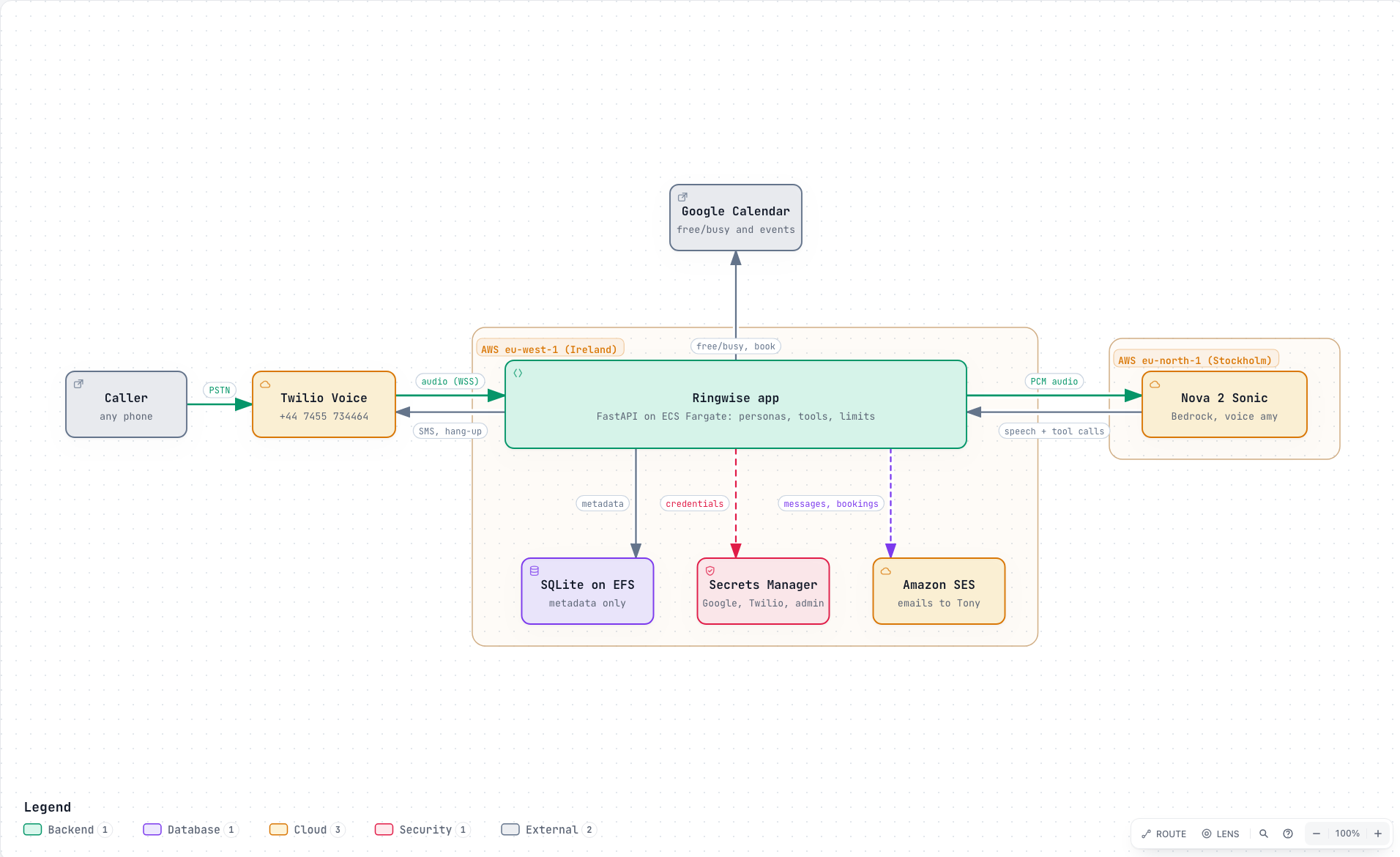
Here's what happens on a call:
- Twilio Programmable Voice answers the call and opens a Media Streams WebSocket to my app.
- My Python 3.12 FastAPI app runs on ECS Fargate in eu-west-1 (Ireland). It sits in the middle and passes audio both ways.
- The audio goes to Amazon Nova 2 Sonic (
amazon.nova-2-sonic-v1:0) on Amazon Bedrock in eu-north-1 (Stockholm). This is a speech-to-speech model. Audio goes in, audio comes out, and I'm using the British voiceamy. - When the model needs to do something real, like check my calendar for a free slot, book it or pass on a message, it makes a tool call. My app runs the tool and sends the result back so the conversation can carry on.
There's one unglamorous step in the middle: codec conversion. Twilio sends and expects mu-law at 8kHz, which is phone-quality audio. The model works with PCM. So every chunk of audio gets converted on the way in and again on the way out. It's not exciting, but if you get it wrong the line sounds like a robot underwater.
I didn't start from scratch. The event flow is adapted from the excellent aws-samples/sample-amazon-nova-sonic-twilio-integration (MIT-0). If you want to try this yourself, start there. It saved me a lot of time.
Why speech-to-speech?
My first plan was the classic pipeline: speech-to-text → LLM → text-to-speech, with Amazon Transcribe and Amazon Polly on either side of a language model. It works, and lots of good voice bots are built that way.
But a phone call is unforgiving. Every hop in a pipeline adds delay, and people notice delay on the phone straight away. A pipeline also makes turn-taking and barge-in (the caller cutting in mid-sentence) awkward to get right. With one speech-to-speech model doing the listening, thinking and speaking, I got lower latency and a much more natural back-and-forth. It feels like a conversation, not a series of voicemail prompts.
There was one catch. Nova 2 Sonic is only available in a few regions: us-east-1, us-west-2, eu-north-1 and ap-northeast-1. I wanted processing to stay in the EU, so I picked Stockholm for the model and kept the app itself in Ireland, also in the EU.
Privacy by design, enforced in code
People who ring a number they don't know deserve to know what happens to their voice and details. I set myself a rule: anything that matters gets enforced in code, not just written in the prompt.
- No recordings, no transcripts. Audio is processed live and thrown away.
- Minimal data. The only things the system handles are your name, your phone number, a short message and, if you book, the calendar slot.
- Guardrails live in the tool schemas. The tools only accept the fields they need, in the shape they expect. The model can't push anything else through them.
- Allowlisted structured logs. Logs only contain fields I've explicitly allowed, so nothing sensitive slips in by accident.
- Upfront disclosure. Every call starts with the assistant saying it's an AI and that the call isn't recorded.
None of this is hard to build. The trick is to decide on it at the start, before you've written code that assumes otherwise.
Cost guardrails
Running this on my own AWS account means a runaway call costs me real money. So there are three simple limits:
- a maximum call length,
- a per-caller daily limit, and
- a daily minutes cap across the whole line.
They're boring, and they let me leave the number public without worrying about it.
How I built it
I used Claude Code as my coding assistant throughout. It was especially useful for the fiddly bits like the audio conversion, WebSocket event handling and test scaffolding. I still reviewed and shaped everything myself, but it made a solo evenings-and-weekends project move a lot faster.
The tests cover the parts I'm most worried about getting wrong:
- tool logic (taking messages, finding slots, booking calls),
- booking conflicts, so two callers can't grab the same slot,
- Twilio signature validation, so only genuine Twilio requests get through,
- and more besides.
Lessons learned
1. Keep the agent's scope narrow. My assistant does two things: it takes messages and it books calls. Each extra job is another way for the conversation to go off track. If someone asks for something else, the honest answer is "leave a message and Tony will get back to you." The agent shouldn't improvise.
2. Guardrails belong in schemas, not just prompts. A prompt is a request. A schema is a rule. If a tool should only ever receive a name, a number and a short message, make it impossible for it to accept anything else.
3. Latency is everything on the phone. People forgive a slightly clumsy sentence. They don't forgive silence. This one point drove most of my architecture choices, from speech-to-speech down to where each part runs.
4. Test with a real call checklist. Unit tests are essential, but they don't tell you how a call feels. I keep a call checklist: leaving a message, booking a call, asking for a slot that's already taken, interrupting the assistant mid-sentence, asking something out of scope, and so on. I phone the line and go through all of them after every meaningful change. It catches things no automated test will.
Give it a ring
The best way to judge a voice agent is to talk to one. Call +44 7455 734464. Leave me a message about a project or book a 20-minute chat, and see how it feels.
More demos are coming soon, and I'll write each of them up here as I go. Thanks for reading.